Part of the guide: What is Claude Code? What it does, what it costs, and how to start
How to install Claude Code on Mac (native installer, Homebrew or npm)
 Written by Jeff Pascal · Updated (macOS 13+, Claude Code 2.1) · 5 minute read
In short
- Open Terminal and paste
curl -fsSL https://claude.ai/install.sh | bash. Then open a new window and runclaude --version: a version number means it worked. - Homebrew works too (
brew install --cask claude-code), but it does not update itself. npm needs Node.js 22 or later. - You need macOS 13 or newer, 4 GB of RAM and a paid Claude plan (Pro is the smallest paid plan that includes it; see claude.com/pricing, checked 18 November 2026).
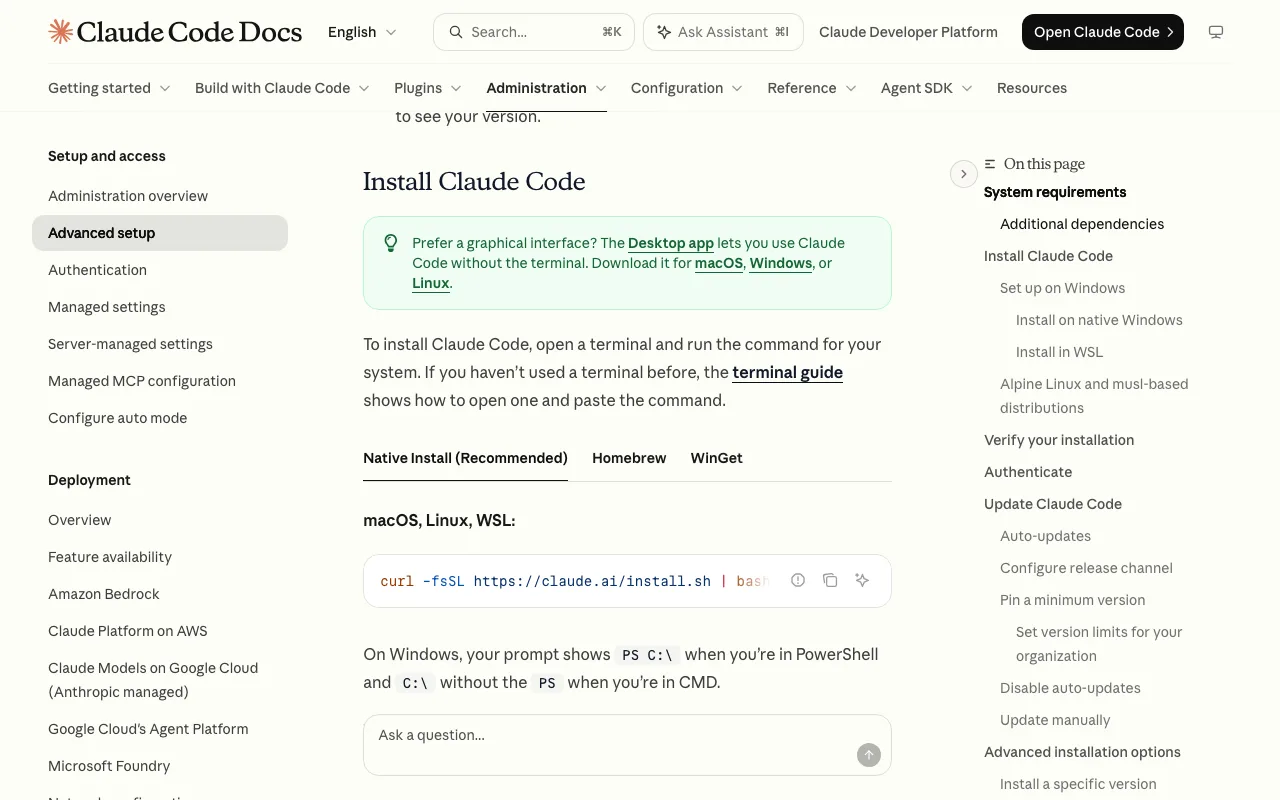
To install Claude Code on a Mac, open Terminal and paste this command:
curl -fsSL https://claude.ai/install.sh | bashWhen it finishes, open a new Terminal window and type claude --version. If you see a version number, Claude Code is installed. Type claude to sign in and start. You need macOS 13 or newer and a paid Claude plan.
Checked on 18 November 2026 against Anthropic's setup page and terminal guide. Not sure what Claude Code is yet? Start with what is Claude Code.
Requirements
| What | Details |
|---|---|
| macOS | 13.0 or newer. Apple menu → About This Mac shows your version |
| Processor | Intel or Apple Silicon |
| Memory | 4 GB of RAM or more |
| Internet | Needed to install and to work |
| Account | Pro, Max, Ultra, Team or Enterprise plan, or a Console account. The free plan does not include Claude Code |
| Time | About 5 minutes |
Which install method?
| Method | Command | Updates | Needs |
|---|---|---|---|
| Native (recommended) | curl -fsSL https://claude.ai/install.sh | bash |
Automatic, in the background | Nothing else |
| Homebrew | brew install --cask claude-code |
By hand: brew upgrade claude-code |
Homebrew |
| npm | npm install -g @anthropic-ai/claude-code |
Automatic if npm can write to its folder | Node.js 22 or later |
Pick the native installer unless you already manage your Mac's tools with Homebrew. Prefer no terminal at all? The Claude desktop app includes Claude Code in its Code tab; see desktop vs CLI.
Step 1: choose a plan
Open claude.com/pricing for current prices. Pro is the cheapest paid plan that includes Claude Code, billed monthly or at a lower yearly rate, before tax (read on 18 November 2026). Sign up with Try Claude.
Which plan fits how much you will use it: how much Claude costs.
Step 2: open Terminal
Press Cmd + Space, type Terminal and press Enter. A window opens with a blinking cursor. This is where you type commands.
Step 3: run the install command
Paste the command with Cmd + V and press Enter:
curl -fsSL https://claude.ai/install.sh | bashThe installer shows no progress while it downloads, so it can look stuck. Leave the window open. When it is done you see "Claude Code successfully installed!".
With Homebrew instead: run brew install --cask claude-code. This cask follows the stable channel, which is usually about a week behind and skips releases with major problems. For the newest version as soon as it ships, use brew install --cask claude-code@latest.
With npm instead: you need Node.js 22 or later. Run npm install -g @anthropic-ai/claude-code without sudo; Anthropic's page says an install that needs sudo cannot update itself.
Step 4: check the install
Close the window, open a new one (Cmd + N) and type:
claude --versionYou see a version number followed by (Claude Code), for example 2.1.326 (Claude Code). Yours may be higher; the number changes often.
For a full report, run claude doctor. It reads and prints the state of your install and settings, and changes nothing.
Step 5: sign in
Go to a folder you want to work in (cd Documents/my-project) and type claude. Your browser opens to sign in. Use the account with the paid plan. The login is saved, so you do this once.
Inside Claude Code you move with the arrow keys, Esc stops what Claude is doing, and /exit closes it. What to type in your first conversation: Claude Code tutorial for beginners.
If it does not work
zsh: command not found: claude. The install worked, but its folder, ~/.local/bin, is not on your PATH (the list of folders where the Mac looks for programs). First open a new Terminal window and try again. If the message stays, run these two lines one at a time, then open a new window:
echo 'export PATH="$HOME/.local/bin:$PATH"' >> ~/.zshrc
source ~/.zshrc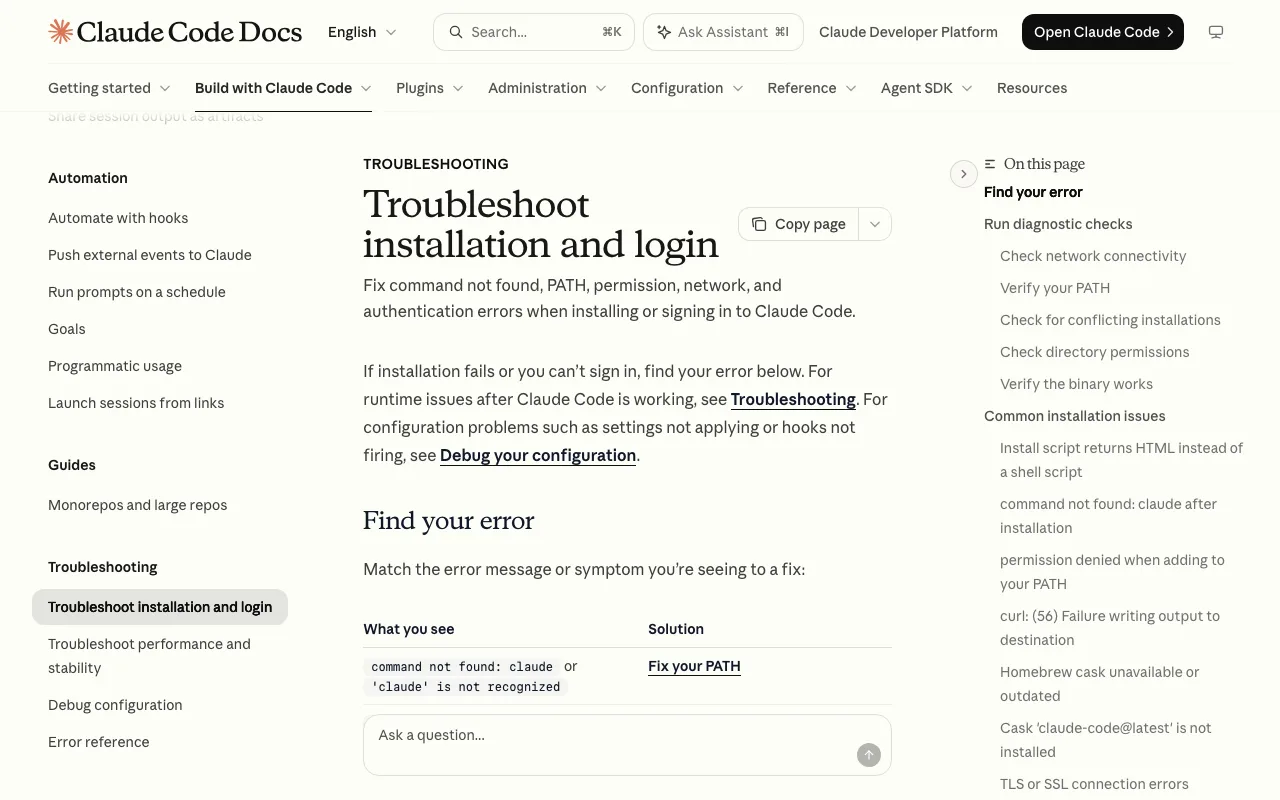
zsh: permission denied: /Users/you/.zshrc. Your user cannot write to that file, so the PATH line was not saved. The official page explains how to check the owner with ls -l ~/.zshrc and fix it.
syntax error near unexpected token '<' or a 403. The command downloaded something other than the install script, such as a web page or an error. Match the exact message in the Find your error table.
App unavailable in region. Claude Code is not offered in your country; see Anthropic's list of supported countries.
More errors after the install (sign-in, limits, a session that hangs): Claude Code not working.
Updating and uninstalling
- Native install: updates download in the background and apply the next time you start Claude Code. To update now, run
claude update. - Homebrew: run
brew upgrade claude-code(orbrew upgrade claude-code@latest). - Uninstall the native install:
rm -f ~/.local/bin/claude, thenrm -rf ~/.local/share/claude. - Uninstall with Homebrew:
brew uninstall --cask claude-code.
How you know it worked
claude --versionprints a version number in a new window.claudestarts, you are signed in, and it answers a simple question such as "what files are in this folder?".
Next: your first session, then give Claude standing instructions with a CLAUDE.md file.
Once Claude Code is up and running on your Mac, Team of One is a good place to go next. It's my WhatsApp community for people learning to amplify their own work with AI.
Questions
Do I need Node.js to install Claude Code on a Mac?
No. The recommended native installer and Homebrew do not need Node.js. Only the npm install does, and it needs Node.js 22 or later.
Should I use Homebrew or the native installer?
The native installer updates itself in the background. Homebrew does not: you run brew upgrade claude-code yourself. The claude-code cask follows the stable channel, about a week behind; claude-code@latest gets new versions as soon as they ship.
Does Claude Code work on an older Mac?
It needs macOS 13.0 or newer. Check your version under Apple menu → About This Mac. Both Intel and Apple Silicon Macs work.
Is it free to install?
Installing costs nothing, but using it needs a paid plan: Pro, Max, Ultra, Team or Enterprise, or a Console account. See how much Claude costs.
How do I uninstall Claude Code on a Mac?
For the native install, run rm -f ~/.local/bin/claude and rm -rf ~/.local/share/claude in Terminal. For Homebrew, run brew uninstall --cask claude-code.
Sources
- code.claude.com: install commands (native, Homebrew stable and latest casks, npm with Node.js 22+, no sudo), auto-updates on native installs only, macOS 13.0+, 4 GB RAM, claude --version, claude doctor, claude update, uninstall commands, account types, checked 18 November 2026
- code.claude.com: Cmd + Space for Terminal; the installer shows no progress; the "Claude Code successfully installed!" message; sign-in in the browser, checked 18 November 2026
- code.claude.com: the "zsh: command not found: claude" error, ~/.local/bin and the two PATH lines for ~/.zshrc; permission denied on ~/.zshrc; 403 and "syntax error near unexpected token" errors; the Find your error table, checked 18 November 2026
- claude.com: Claude plans and prices: Pro paid plan with monthly or lower yearly billing, checked 18 November 2026
- code.claude.com: the Desktop app has Claude Code in the Code tab; universal build for Intel and Apple Silicon, checked 18 November 2026
Free WhatsApp community
Learning AI? Learn it on real work.
In “Team of one” I post what I actually tried on my own work. Most of it is in Romanian, but ask in English any time and we will work it out together.
Join the community