What is Claude Code? What it does, what it costs, and how to start
 Written by Jeff Pascal · Updated · 7 minute read
In short
- Claude Code is an AI agent from Anthropic that works on the files in a folder on your computer: it reads them, edits them and runs commands, instead of only answering in a chat.
- You use it from a terminal, the Claude desktop app, VS Code or JetBrains, or the web. You describe the result in plain words; you do not need to write code.
- It needs a paid Claude plan. Pro is the smallest paid plan that includes Claude Code, with monthly or yearly billing; check current prices at claude.com/pricing (checked 18 November 2026).
- It needs macOS 13+, Windows 10 (1809)+ or a supported Linux, 4 GB of RAM and an internet connection.
Claude Code is an AI agent made by Anthropic that works on your own computer. It reads the files in a folder, edits them and runs commands, so it does the work instead of only telling you how. You describe what you want in plain words ("rename these photos by date", "fix the failing test"), and it carries out the steps.
Anthropic built it for software developers, and that is still its main use. But the same mechanism works for anyone whose work lives in files: documents, spreadsheets, photos, video. Below: what it does, who it's for, what it costs and where to go next. I checked everything against Anthropic's official pages on 18 November 2026.
How it differs from a normal chat
In a chat with Claude or ChatGPT, you ask, you get text back, and then you do the work: copy, paste, open programs, click. Claude Code does that second part too. Ask it to "sort the files in this folder by year" and it looks in the folder, writes the commands and runs them.
| Claude (chat) | Claude Code | |
|---|---|---|
| Where it works | Inside the conversation | On the files in the folder you start it in |
| What it does | Answers with text, files you download | Reads and changes files, runs programs |
| Who does the steps | You | It does; you choose how much it asks first |
| What you need | Any account, even free | A paid plan (Pro or higher) |
Anthropic calls it an "agentic coding tool". Agentic means it plans and takes several steps by itself, checking the result of each one, until the task is done or it needs you.
Where you can use it
Claude Code is one engine with several front doors:
- Terminal (CLI): the original. You type
claudein a folder and talk to it there. - Desktop app: the Claude app for Mac and Windows has a Code tab. You pick a folder and review changes with buttons, no terminal. See Claude Code desktop vs CLI.
- Editors: extensions for VS Code and JetBrains IDEs.
- Web: sessions that run in the cloud on Anthropic's machines.
The terminal and the desktop app read the same settings and the same instruction files, so what you set up in one carries over.
What you can do with it
For developers, the official examples are building features, fixing bugs, explaining an unfamiliar codebase and making Git commits.
The same "describe it, it runs the commands" approach also helps people who do not write code:
- Files. Rename 300 photos by the date they were taken, move invoices into one folder per month, find duplicates.
- Data. Merge two exported spreadsheets, total a CSV of orders by customer, turn a list of emails into a table.
- Documents. Fill a set of letters from a template and a list of names, convert a folder of Word files to PDF.
- Video. A clip is a file too. Claude Code can run free programs such as ffmpeg to cut, crop for phones or burn in subtitles. See Claude Code for video editing.
- Small tools. A script that checks a supplier's price list every morning, a simple internal web page.
A bakery in Manchester could ask it to read last month's order exports and list the ten best-selling items by weekday. A plumber in Ohio could have it rename and file a year of job photos by address. Neither needs to know which commands do that.
What it does not do: guess what you did not say, or check its own work as carefully as you would. Read what it proposes and look at the result before you rely on it.
Do you need to know how to code?
No. You write what you want; it picks the commands. Your part is to read what it is about to do, answer its questions and check the result. If a step is unclear, ask: "what does this command do?".
How often it asks you depends on the permission mode. Since version 2.1.283, a terminal session starts in auto mode: a second model reviews each action and stops risky ones, so Claude does not ask you at every step. While you are learning, start it with claude --permission-mode manual, or press Shift+Tab until you see manual mode: then it asks before it edits a file or runs a command. Details on the official permission modes page.
Never opened a terminal? Anthropic has a short terminal guide, or you can skip the terminal entirely with the desktop app.
You can also write to it in your own language and have it always answer in that language: see the Claude Code language setting.
What you need and what it costs
Requirements from the official setup page, checked on 18 November 2026:
- macOS 13 or newer, Windows 10 version 1809 or newer, or Ubuntu 20.04+, Debian 10+ or Alpine 3.19+;
- at least 4 GB of RAM;
- an internet connection;
- a paid Claude plan: Pro, Max, Ultra, Team or Enterprise, or a Console account with API credits. The free plan does not include Claude Code.
Pro is the cheapest plan that includes Claude Code; Max and Ultra sit above it, and the free plan has no Claude Code. The current price of each plan is on Claude's pricing page (read on 18 November 2026).
Each plan has usage limits. Max gives five times Pro's usage and Ultra ten times, per the pricing page. When a bigger plan is worth it: how much Claude costs. What happens when you reach a limit: Claude usage limits.
How to install it
On a Mac or Linux it is one command pasted into the terminal. Windows has its own command for PowerShell and for CMD. The desktop app is a normal download.
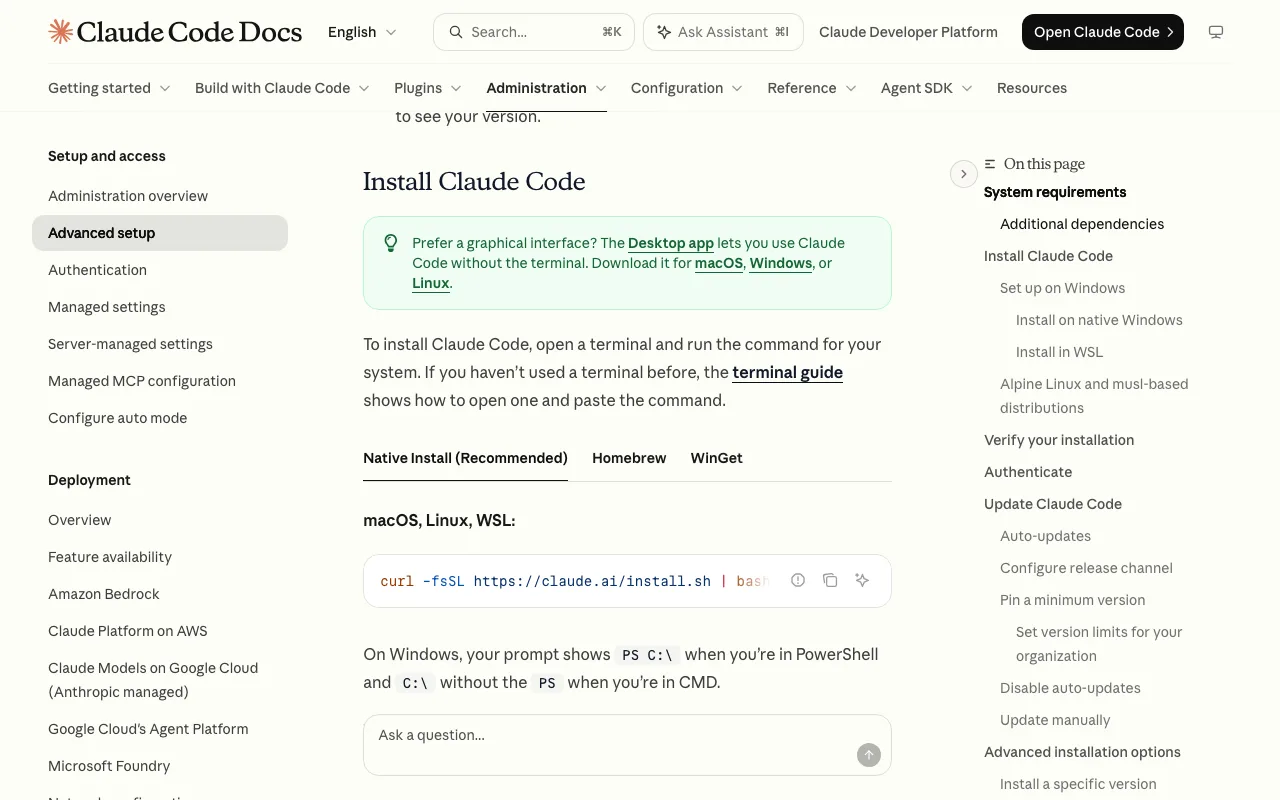
- Mac: how to install Claude Code on Mac.
- Windows: how to install Claude Code on Windows.
- No terminal: the desktop app from claude.com/download, compared in desktop vs CLI.
The first session
Open a terminal in the folder you want to work in and type claude. The first time, it opens your browser so you can sign in. Then write a request that changes nothing, such as "what is in this folder?", and read the answer. The full walk-through, with the commands you need in week one (/help, /resume, /usage), is in the Claude Code tutorial for beginners.
Make it remember your rules
Two features turn Claude Code from a blank assistant into one that knows your work:
- CLAUDE.md is a text file of standing instructions that Claude reads at the start of every session: how your project is laid out, which commands to use, what never to touch. See what is CLAUDE.md.
- Skills are saved procedures you start with
/name, or that Claude uses by itself when your request matches. See Claude Code skills.
Claude Code, Cursor or Codex?
If you are comparing tools: Cursor is a coding app with a choice of models, and Codex is OpenAI's coding agent, included in ChatGPT plans. Claude Code runs Claude models and comes with a Claude plan. Prices and who should pick which: Claude Code vs Cursor vs Codex.
When it does not work
The problems people hit first are claude not being found after the install (usually fixed by opening a new terminal window), the Windows command pasted into the wrong window, sign-in errors, and usage limits. The exact messages and fixes are in Claude Code not working.
Getting a tool like this running on your own can be frustrating at first. I host Team of One, a free WhatsApp community for learning to amplify your work with AI, and you are welcome to drop in here if you get stuck.
What to remember
- Claude Code acts on your computer; a chat only answers.
- You give it requests in plain sentences. In manual mode you approve each edit and command.
- It needs a paid plan, Pro or higher, and a reasonably recent Mac, Windows or Linux computer.
- Put your standing rules in CLAUDE.md, and check the result before you use it.
Every article in this guide
- Claude Code
How to install Claude Code on Mac (native installer, Homebrew or npm)
Install Claude Code on Mac with one Terminal command: curl -fsSL https://claude.ai/install.sh | bash. Homebrew option, checks, the PATH fix, updates.Jeff Pascal · 18 November 2026 · 5 min read - Claude Code
How to install Claude Code on Windows 10 and 11 (PowerShell, no WSL needed)
Install Claude Code on Windows with one PowerShell command, no WSL or admin rights needed. Git for Windows, the CMD and WinGet options, checks and error fixes.Jeff Pascal · 18 November 2026 · 5 min read - Claude Code
Claude Code desktop vs CLI: which one should you use?
Claude Code desktop vs CLI: the desktop app and the terminal run the same engine. What differs, which to pick, how to move a session from one to the other.Jeff Pascal · 18 November 2026 · 5 min read - Claude Code
Claude Code tutorial for beginners: your first session, step by step
Claude Code tutorial for beginners: start in the right folder, switch to manual mode, ask a safe first question, make one small change, learn the key commands.Jeff Pascal · 18 November 2026 · 6 min read - Claude Code
What is CLAUDE.md? The Claude Code instructions file, with examples
CLAUDE.md is a Markdown file Claude Code reads at the start of every session. Where the file goes, what to put in it, and two example CLAUDE.md files to copy.Jeff Pascal · 18 November 2026 · 6 min read - Claude Code
Claude Code skills: what they are and how to create your own
Claude Code skills are SKILL.md files of instructions Claude uses when relevant or you run with /name. Where they live, examples, and how to create one.Jeff Pascal · 18 November 2026 · 5 min read - Claude Code
Claude Code language setting: make it answer in Spanish, German, Japanese or any language
The Claude Code language setting: add "language": "spanish" to settings.json and Claude answers in Spanish. What it changes, what stays English, dictation.Jeff Pascal · 18 November 2026 · 3 min read - Claude Code
Claude Code vs Cursor vs Codex: which AI coding tool should you use?
Claude Code vs Cursor, plus OpenAI Codex: where each runs, which models it uses, how the official pricing plans compare, and who should pick which.Jeff Pascal · 18 November 2026 · 6 min read - Claude Code
How much does Claude cost? Free, Pro, Max, Ultra and Team plans
What you get free vs paid on Claude: Free, Pro, Max, Ultra and Team. Which plans include Claude Code, when Max is worth it, and where to see today's prices.Jeff Pascal · 22 November 2026 · 5 min read - Claude Code
Claude usage limits: how the 5-hour and weekly limits work, and what to do when you hit one
Claude usage limits run in a 5-hour session and a weekly window, shared by the app and Claude Code. Where to see them, limits per plan, how to make them last.Jeff Pascal · 18 November 2026 · 5 min read - Claude Code
Claude Code not working? Find your error message and the fix
Claude Code not working? Check status.claude.com, then match your exact error: command not found, 403, OAuth, usage limits, 529 Overloaded, hangs, wrong folder.Jeff Pascal · 18 November 2026 · 6 min read
Questions
Is Claude Code the same as Claude?
Claude is the AI model and the chat app. Claude Code is a separate tool that uses Claude models to work on the files and programs on your computer: it reads them, changes them and runs commands. The chat answers; Claude Code does the steps.
Is Claude Code free?
No. The program costs nothing to install, but using it needs a paid plan: Pro, Max, Ultra, Team or Enterprise, or a Console account with API credits. The free Claude plan does not include it. Details in how much Claude costs.
Do I need to know how to code?
No. You write what you want in plain sentences, and Claude Code picks the commands. You still read what it proposes and check the result.
Does it work on Windows?
Yes, on Windows 10 version 1809 or newer and Windows 11. The steps are in install Claude Code on Windows.
Can I use it without the terminal?
Yes. The Claude desktop app has Claude Code in its Code tab. The differences are in Claude Code desktop vs CLI.
How is it different from Cursor or Codex?
Cursor is a coding app with a choice of models; Codex is OpenAI's agent, part of ChatGPT plans. Claude Code runs Claude models and comes with a Claude plan. The comparison is in Claude Code vs Cursor vs Codex.
Sources
- code.claude.com: Claude Code reads your codebase, edits files, runs commands; available in the terminal, IDE, desktop app and browser, checked 18 November 2026
- code.claude.com: system requirements: macOS 13.0+, Windows 10 1809+, Ubuntu 20.04+, Debian 10+, Alpine 3.19+, 4 GB+ RAM, internet; install commands; account types (Pro, Max, Ultra, Team, Enterprise, Console); the free plan does not include Claude Code, checked 18 November 2026
- claude.com: Claude plans: Free, Pro (monthly or yearly billing), Max (five times Pro), and Ultra (ten times Pro); Claude Code included from Pro; see current prices on claude.com/pricing, checked 18 November 2026
- code.claude.com: permission modes: from v2.1.283 terminal and VS Code sessions start in auto mode (a classifier model reviews actions); Manual mode asks before edits and commands; claude --permission-mode manual, checked 18 November 2026
- code.claude.com: the terminal guide for people who have never used one, checked 18 November 2026
- code.claude.com: quickstart: cd into a folder, run claude, sign in in the browser; the prompt shows version, model and folder; also on the web, desktop, VS Code, JetBrains, Slack, checked 18 November 2026
Free WhatsApp community
Learning AI? Learn it on real work.
In “Team of one” I post what I actually tried on my own work. Most of it is in Romanian, but ask in English any time and we will work it out together.
Join the community